
Module : Report ( Working Time Account - WTA )
Overview
The Working Time Account (WTA) is used to track and control the working hours of Mini-Jobbers to ensure their total working hours remain within the legally defined monthly earning limits.
It records whether hours are added to or taken from the WTA, and maintains the balance over time across payroll periods.
The WTA Report allows administrators to review working hours and paid hours, monitor any added or taken hours, and track the current WTA balance.
Relationship between WTA Report and Mini-Jobber Earnings
Mini-Jobbers are legally subject to a maximum monthly earning limit, which must not be exceeded.
In Jeydoo, this limit is defined in the Maximum Earning field within each Mini-Jobber’s master data.
To ensure compliance with this legal requirement, the system uses the Working Time Account (WTA) to monitor and manage the employee’s earnings based on recorded working hours and payroll calculations.
The WTA plays a critical role in ensuring that a Mini-Jobber’s total earnings remain within the allowed threshold.
Therefore, the accuracy of the WTA account is essential for correct payroll processing and legal compliance when handling Mini-Jobbers.
1. WTA Report
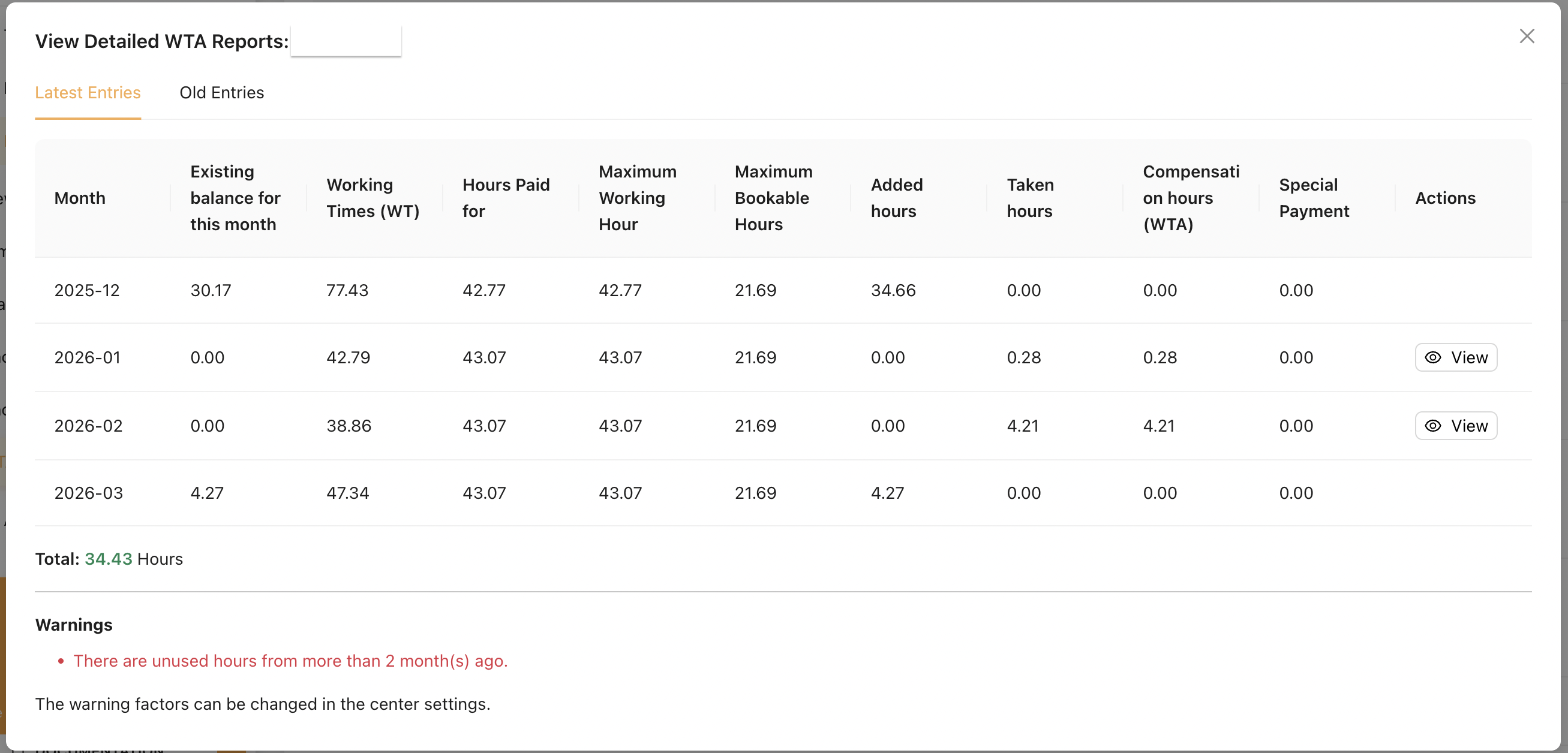
Example of WTA Report
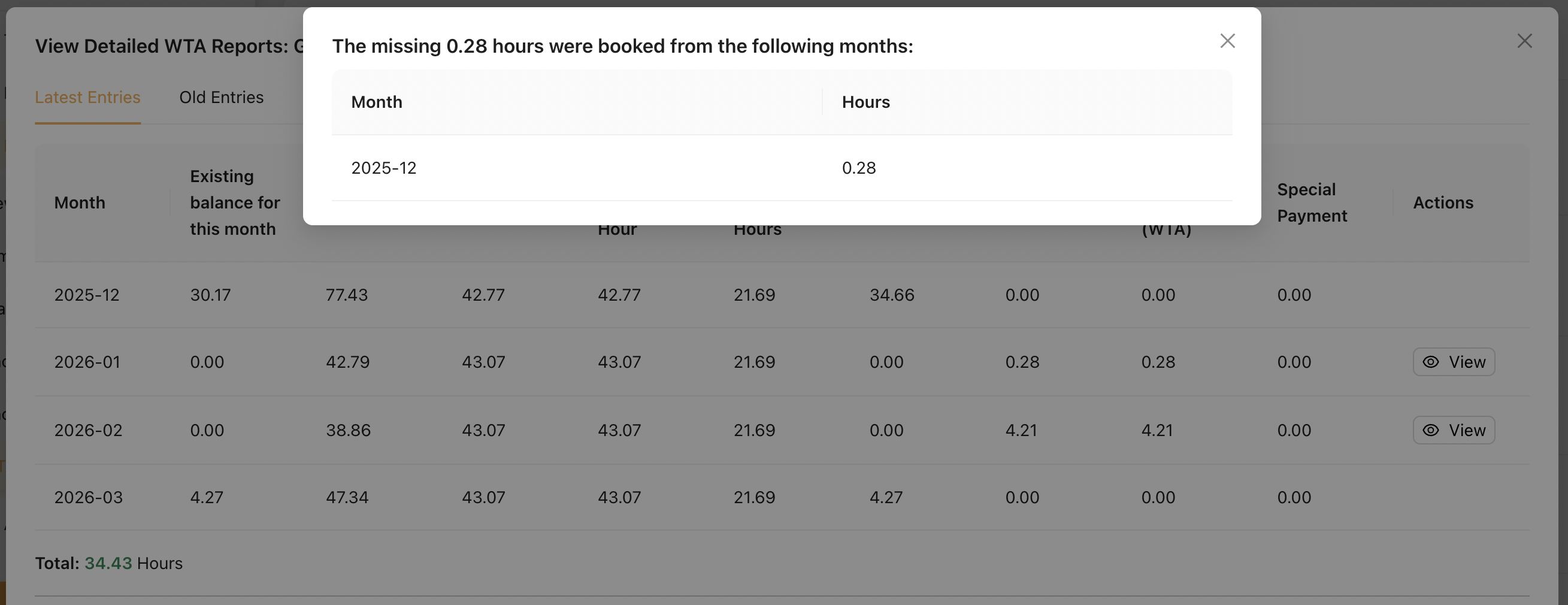
[View] button :
1.1 Table Explanation
| Field | Explanation |
|---|---|
| Month |
The payroll month this record refers to.
|
| Existing balance for this month |
WTA hours added in this month when total working hours exceed the maximum working hours. |
| Working Times (WT) |
Total working hours for the month based on time bookings. |
| Hours Paid for |
The number of hours paid for the month, capped by the Maximum Working Hour to comply with the earning limit.
|
| Maximum Working Hour |
The maximum working hours allowed for the month, based on the Maximum earning limit. |
| Maximum Bookable Hours | The maximum number of hours that can be booked into the WTA. Hours exceeding this limit are not allowed to be recorded. |
| Added hours |
Excess working hours added to the WTA.
|
| Taken hours | Hours taken from and booked from the WTA. |
| Compensation hours (WTA) | Confirmation of hours taken from WTA and converted into payable hours. (Always equal to Taken hours.) |
| Special Payment |
Additional payment for excess working hours that are not booked into the WTA, but instead paid directly to the Mini-Jobber.
|
| Actions |
Click the [View] button to see from which month the hours were taken. |
RemarksSpecial Payments
- When a Mini-Jobber’s Total Working Hours exceed the Maximum Working Hour, the excess hours can be handled in two ways during payroll processing:
- Booked into WTA (Working Time Account), or
- Paid directly as Special Payment
- Admin can choose how to split excess hours between WTA and Special Payment during payroll processing.
- Special Payment can only be issued up to 2 times per year per Mini-Jobber.
Maximum Bookable Hours
Calculated based on the Mini-Jobber’s Primary Location settings, using the Minimum Hourly Rate and Maximum Monthly Salary.
Formula : (Maximum Monthly Salary ÷ Minimum Hourly Rate) ÷ 2
Existing Balance for This Month
This value is only displayed for months where added hours are recorded. When WTA hours are later taken or booked, the system deducts them from the earliest available monthly balance (within 12 months). As a result, this value will be gradually reduced until it reaches 0.00.
1.2 Warnings