
Location Finder Module
Overview
The Location Finder is a module designed for centers with multiple locations. It allows Admin to maintain and add their gym locations to the Location Listing, while providing a search function on the frontend for website visitors to find suitable gym locations.
On the Live Site, visitors can search for nearby locations by entering a postcode and specifying a search radius in kilometres (km). Locations that match the search criteria are displayed together with their basic information and distance from the searched postcode.
From the search results, visitors can view further information about a location on its dedicated Location Page or contact the location through a form.
1. Setting up Locations
Before the Location Finder can be used on Ark Site, Admin must first set up the locations that should be available in the system. Each location created will be stored in the Location Listing, where Admin can manage the location information and settings.
To create location, go to Location finder > Locations > Create
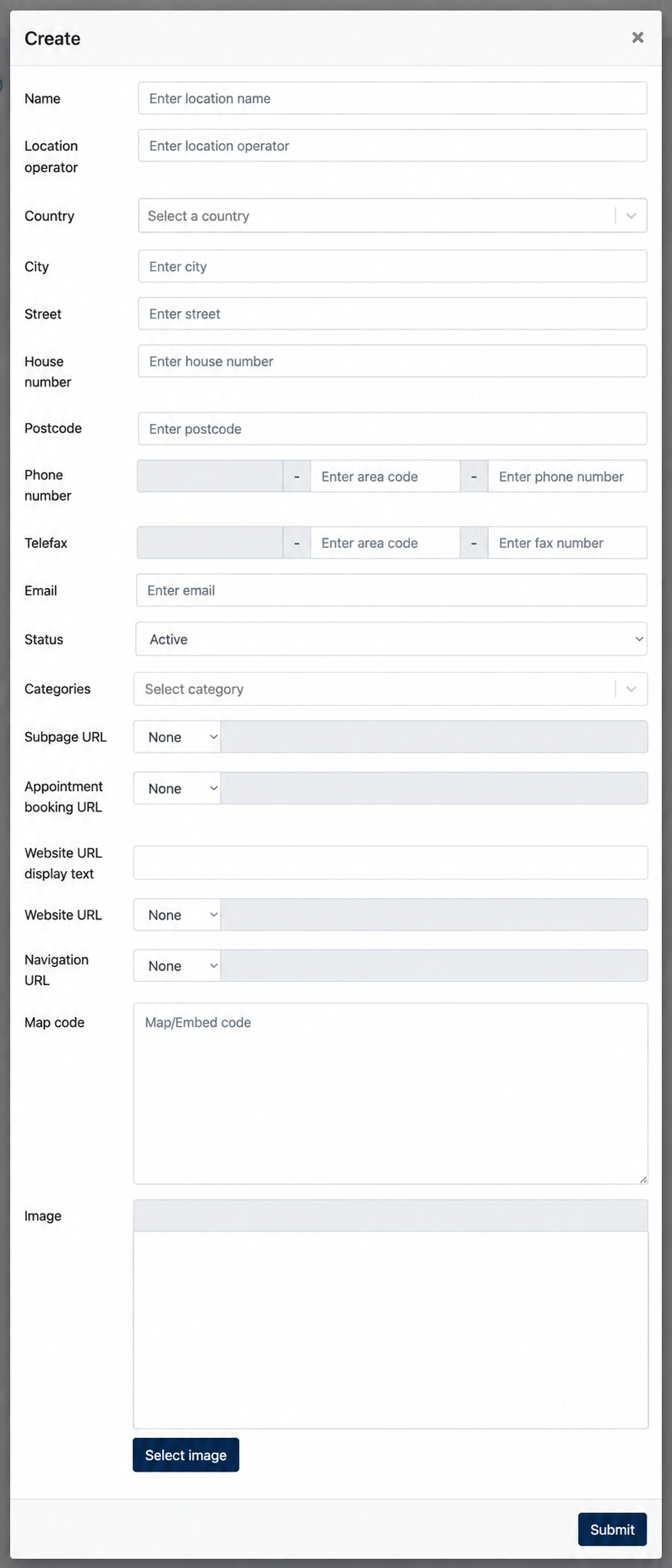
1.1 Create a Location
Click Create to open the Create Location form. Enter the relevant location details and click Submit to save the location. Once created, the location will appear in the Location Listing.
Most fields in the form are self-explanatory. The following fields require additional explanation:
| Field | Description |
|---|---|
| Categories | Assign one or more categories to the location. |
| Subpage URL | Defines the page that users can access to view further information about the location. |
| Appointment Booking URL | (Optional) Defines the link used to direct users to the location's appointment booking page. |
| Website URL Display Text | Defines the text displayed for the website link instead of showing the URL itself. |
| Website URL | Defines the website link for the Location Finder |
| Navigation URL | Defines an external navigation link that users can use to get directions to the location. |
| Map Code | Add the map/embed code used to display the location on a map. |
| Image | Upload an image representing the location. |