
Module : Report ( Working Time Account - WTA )
Overview
The Working Time Account (WTA) is used to track and control the working hours of Mini-Jobbers to ensure their total working hours remain within the legally defined monthly earning limits.
It records whether hours are added to or taken from the WTA, and maintains the balance over time across payroll periods.
The WTA Report allows administrators to review working hours and paid hours, monitor any added or taken hours, and track the current WTA balance.
Relationship between WTA Report and Mini-Jobber Earnings
Mini-Jobbers are legally subject to a maximum monthly earning limit, which must not be exceeded.
In Jeydoo, this limit is defined in the Maximum Earning field within each Mini-Jobber’s master data.
To ensure compliance with this legal requirement, the system uses the Working Time Account (WTA) to monitor and manage the employee’s earnings based on recorded working hours and payroll calculations.
The WTA plays a critical role in ensuring that a Mini-Jobber’s total earnings remain within the allowed threshold.
Therefore, the accuracy of the WTA account is essential for correct payroll processing and legal compliance when handling Mini-Jobbers.
1. WTA Report
WTA Report in Jeydoo:
In Jeydoo, the latest entries section displays the WTA balances for the most recent 12 months in the report.
Old entries refer to WTA records older than 12 months.
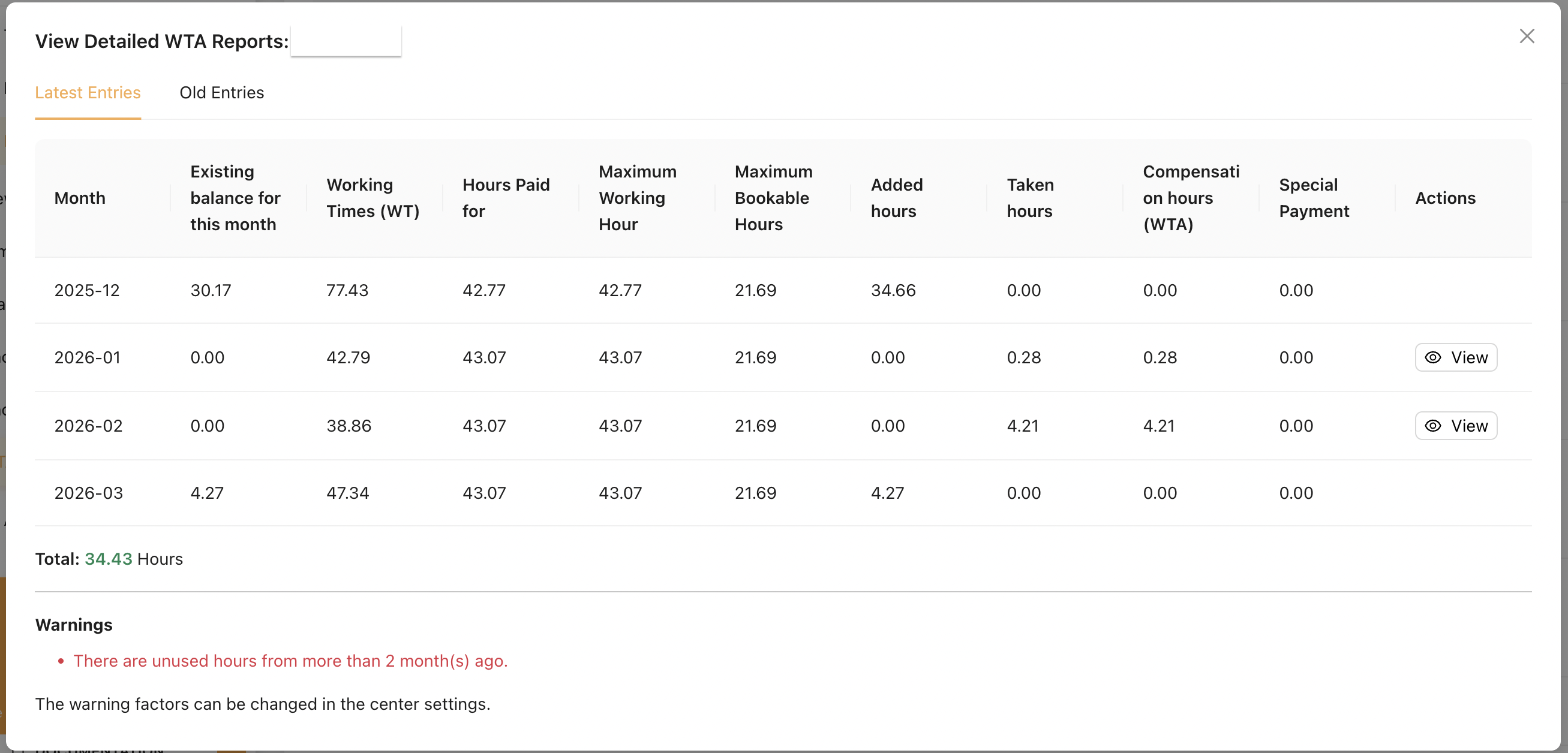
1.1 Fields Explanation
| Field | Explanation |
|---|---|
| Month |
The payroll month this record refers to.
|
| Existing balance for this month |
WTA hours added in this month when total working hours exceed the maximum working hours. |
| Working Times (WT) |
Total working hours for the month based on time bookings. |
| Hours Paid for |
The number of hours paid for the month, capped by the Maximum Working Hour to comply with the earning limit.
|
| Maximum Working Hour |
The maximum working hours allowed for the month, based on the Maximum earning limit. |
| Maximum Bookable Hours | The maximum number of hours that can be booked into the WTA. Hours exceeding this limit are not allowed to be recorded. |
| Added hours |
Excess working hours added to the WTA.
|
| Taken hours | Hours taken from and booked from the WTA. |
| Compensation hours (WTA) | Confirmation of hours taken from WTA and converted into payable hours. (Always equal to Taken hours.) |
| Special Payment |
Additional payment for excess working hours that are not booked into the WTA, but instead paid directly to the Mini-Jobber.
|
| Actions |
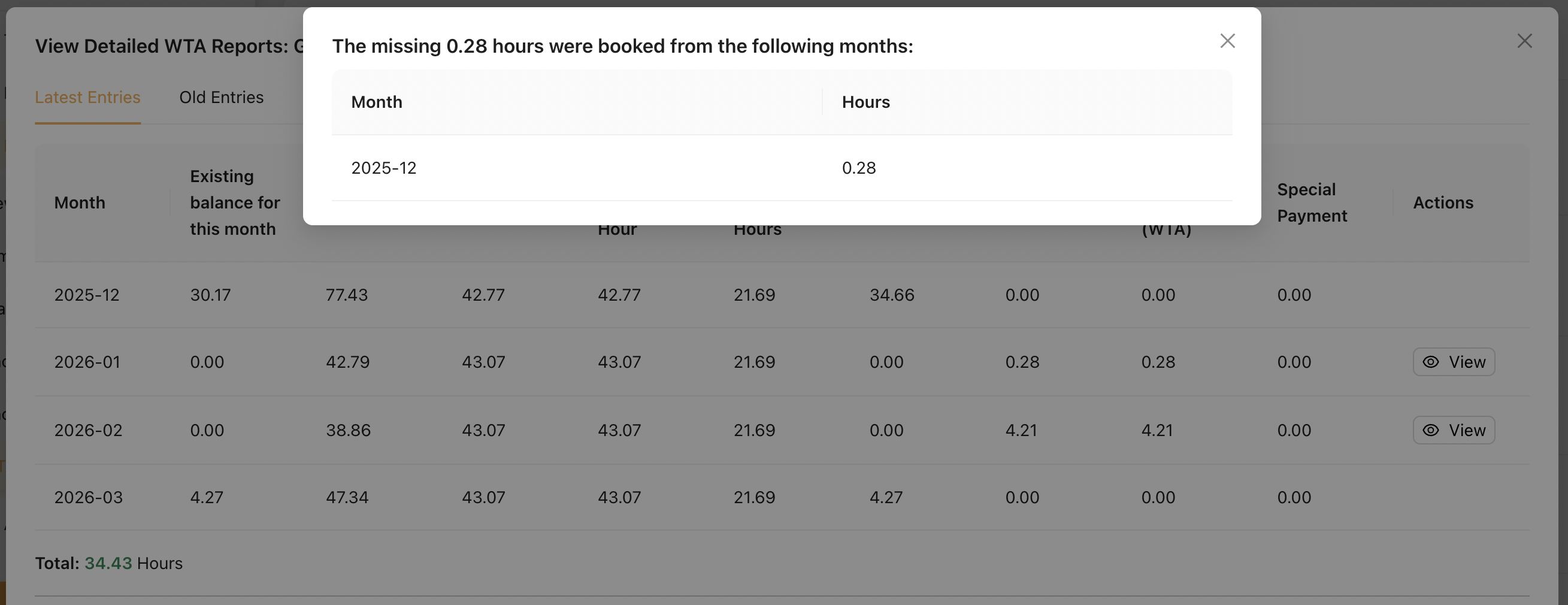
Click the [View] button to see from which month the hours were taken. |
[View] button :
Under this [ View ] button, administrators can review which previous month WTA balances were deducted and used for the current month.
This allows administrators to track how WTA hours from earlier months are applied to supplement the current month’s payable hours.
RemarksSpecial Payments
- When a Mini-Jobber’s Total Working Hours exceed the Maximum Working Hour, the excess hours can be handled in two ways during payroll processing:
- Booked into WTA (Working Time Account), or
- Paid directly as Special Payment
- Admin can choose how to split excess hours between WTA and Special Payment during payroll processing.
- Special Payment can only be issued up to a maximum 3 times per year per Mini-Jobber.
Maximum Bookable Hours
Calculated based on the Mini-Jobber’s Primary Location settings, using the Minimum Hourly Rate and Maximum Monthly Salary.
Formula : (Maximum Monthly Salary ÷ Minimum Hourly Rate) ÷ 2
Existing Balance for This Month
This value is only displayed for months where added hours are recorded. When WTA hours are later taken or booked, the system deducts them from the earliest available monthly balance (within 12 months). As a result, this value will be gradually reduced until it reaches 0.00.
2. Warnings
Jeydoo provides warnings to ensure compliance with legal earning limits and proper management of the Working Time Account (WTA).
Warnings are shown in both the WTA Report Listing and the WTA Report. Mini-Jobbers with warnings are highlighted at the top of the list.
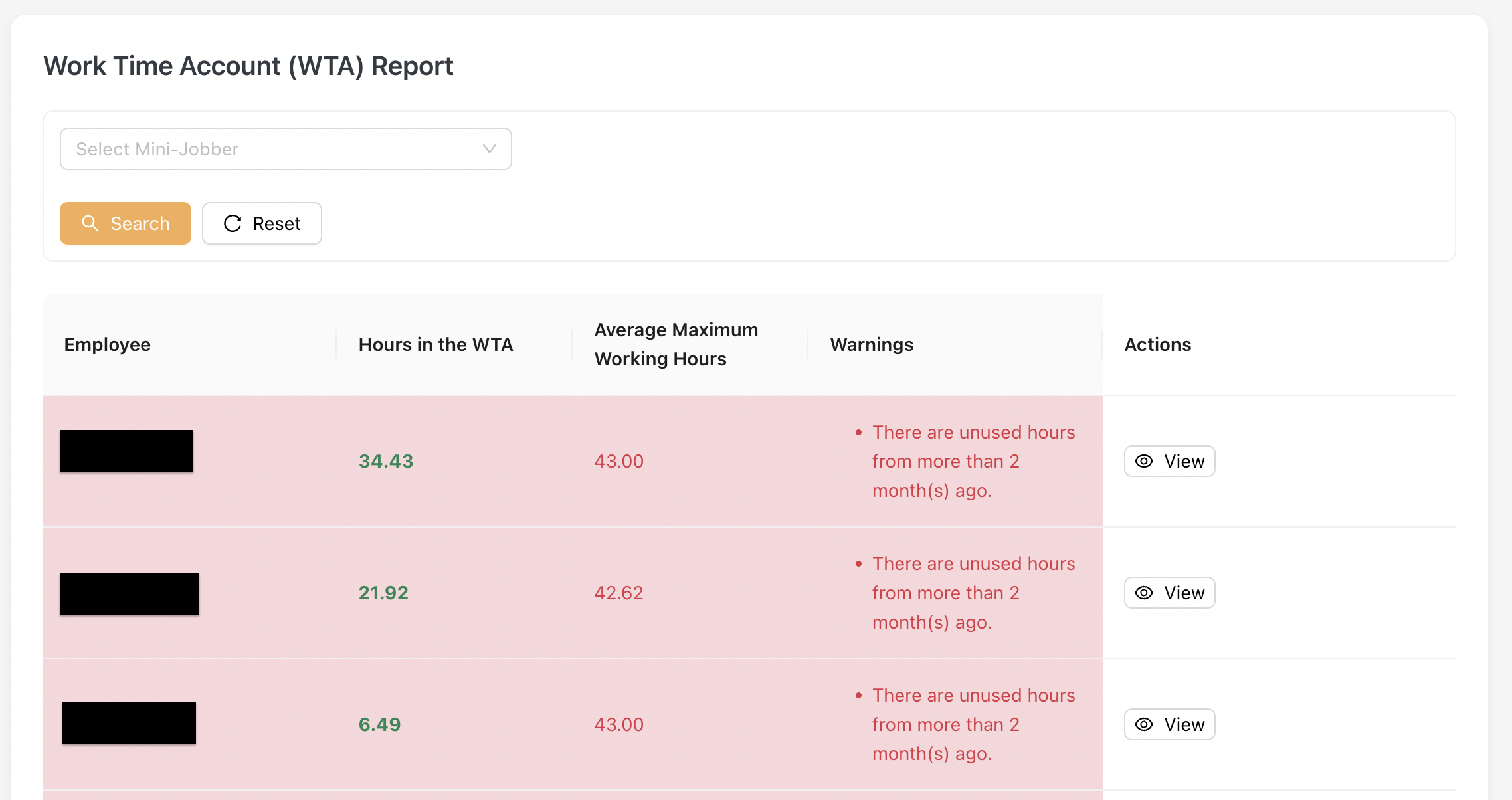
Different Types of Warnings
In Jeydoo, there are a total of 6 types of warnings available.
2.1 Special Payment Limit Warning
The warning is displayed when Jeydoo detects that 2 special payments have already been made to the Mini-Jobber within the same year.
Message :
Two special payments have already been made.
Only one additional special payment can be made in the current year. Please ensure that the Mini-Jobber does not record excessive hours in the Working Time Account (WTA), so that the maximum bookable hours are not exceeded.
2.2 Unused Hours Warnings (older than 11 months)
This warning is triggered when a Mini-Jobber has unused WTA hours that are older than 11 months.
Unused hours refer to the value under “Existing balance for this month” that has not been deducted or used within the past 11 months.
Message :
There are still {x} hours in the WTA that are older than 11 months.
Provided that no more than 3 special payments have been made in the current year, these hours can be paid out to the employee as a special payment.
2.3 Unused Hours Warnings (custom months)
This warning is triggered when added WTA hours from more than {x} months ago have not been taken as compensation hours.
This means that the “Existing balance for the month” from {x} months ago has not been used within the configured time period.
Message :
There are unused hours from more than {x} month ago.
Please check the table before the month {yyyy-mm}
Administrators can configure the threshold for this warning under Admin & Settings > Settings
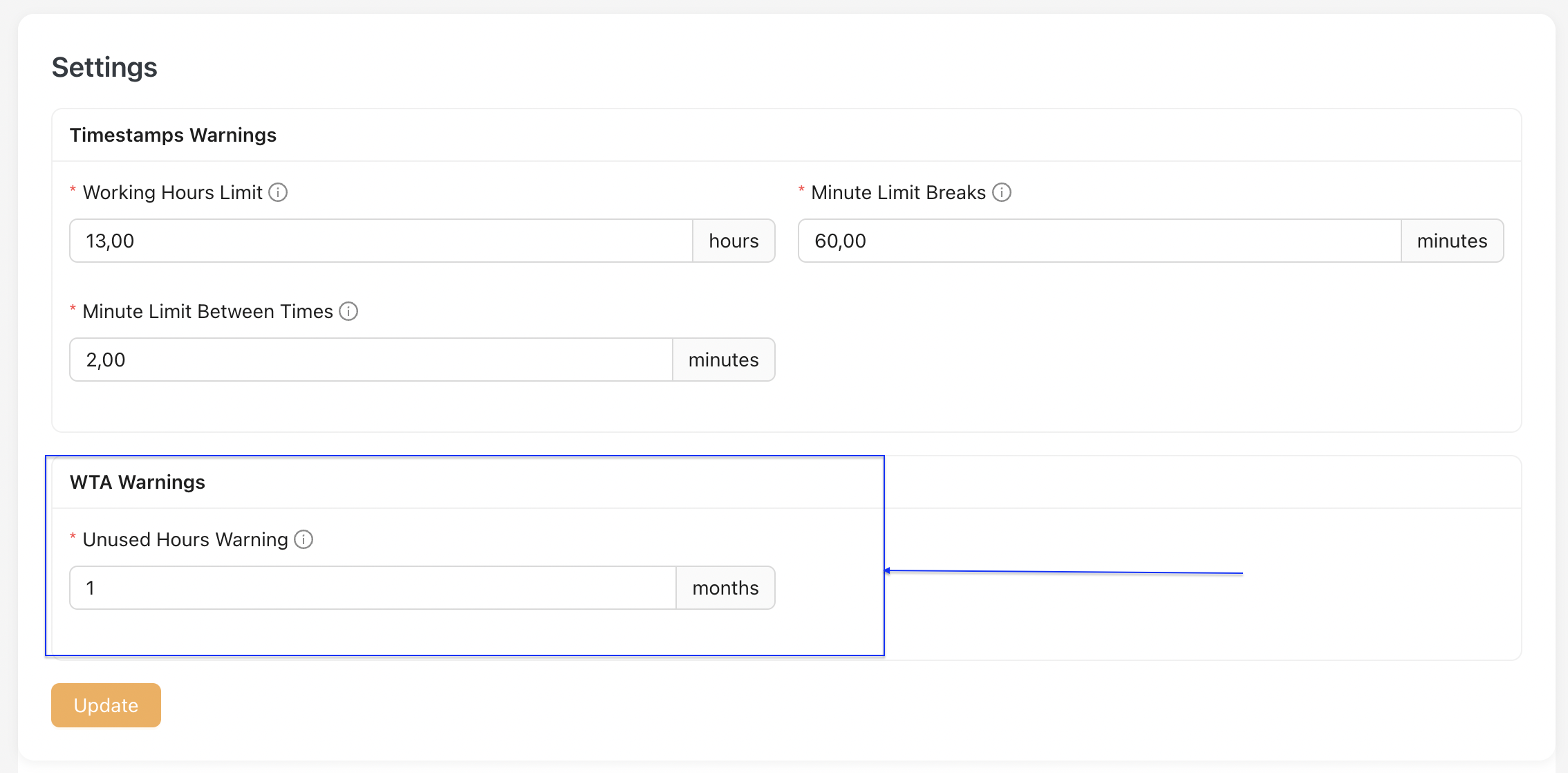
2.4 Total Balance Hours Warnings
This warning is triggered when the total WTA balance exceeds the average Maximum Working Hours over the past 12 months.
This means that the Mini-Jobber has accumulated too many hours in the Working Time Account (WTA), which may lead to exceeding legal limits for marginal employment.
Message:
Too many hours on the working time account
There is a risk that the employee will no longer be classified as a marginally employed worker.
Working time (WTA) > Factor WTA x Maximum Working Time (MaxWT).
2.5 Added Hours Exceed Maximum Bookable Hours Warnings
This warning is displayed when the Added Hours value exceeds the Maximum Bookable Hours.
This means that the Mini-Jobber has accumulated more WTA hours than the allowed booking limit.
The system will still allow the hours to be added. However, a warning will be displayed in the WTA Report.
Message :
Added hours exceed the maximum bookable hours.
2.6 Unused Hours Warnings (older than 12 months)
This warning is triggered when a Mini-Jobber has unused WTA hours that are older than 12 months.
Unused hours refer to the value under “Existing balance for this month” that has not been deducted or used within the past 12 months.
Message :
WTA contains unused hours older than 12 months.
There are still {x} hours in the WTA that are older than 12 months. This violates legal requirements and results in mandatory social insurance contributions.
The same warning also appears on Payroll, when a Mini-Jobber has unused WTA hours that are older than 12 months.
Display Logic
If this warning is triggered during the January 2026 payslip generation, it indicates that there are unused WTA hours that are more than 12 months old. As long as these old hours remain uncleared in the system, the warning will continue to be displayed on subsequent payslips in the following months.
Solution
The client may request assistance from the Proof Point Team to manually clear the outdated data. Once the old WTA hours are removed, the warning will no longer appear on future payslip listings.