
Joining the Member Area
Overview
Users can gain access to the Member Area through different entry points on the ARK Site, depending on how they register or are invited.
Access is assigned based on the user's Member Area role, which determines how they join and access the portal.
1. Member Area Access Methods
| Access Method | Description |
|---|---|
| Online Shop | Visitors can purchase or subscribe to an Online Shop package linked to the Member Area. Upon successful registration, the system assigns the configured role (Member, Trial Member, or Program Participant) and sends the user's login credentials. |
| Member Invitation | Existing Members can invite friends through the Invite Friends option in their Member Area profile. Invitees receive a Magic Link granting temporary access as Trial Members for up to 4 weeks, without requiring login credentials. |
2. Online Shop and Member Area Configuration
Member Area access can be configured through the Online Shop when creating or editing a membership package.
By enabling Link Package to Member Area, Admin can assign the appropriate Member Area role to the package.
Example Screenshot from [ Online Shop > Package ]
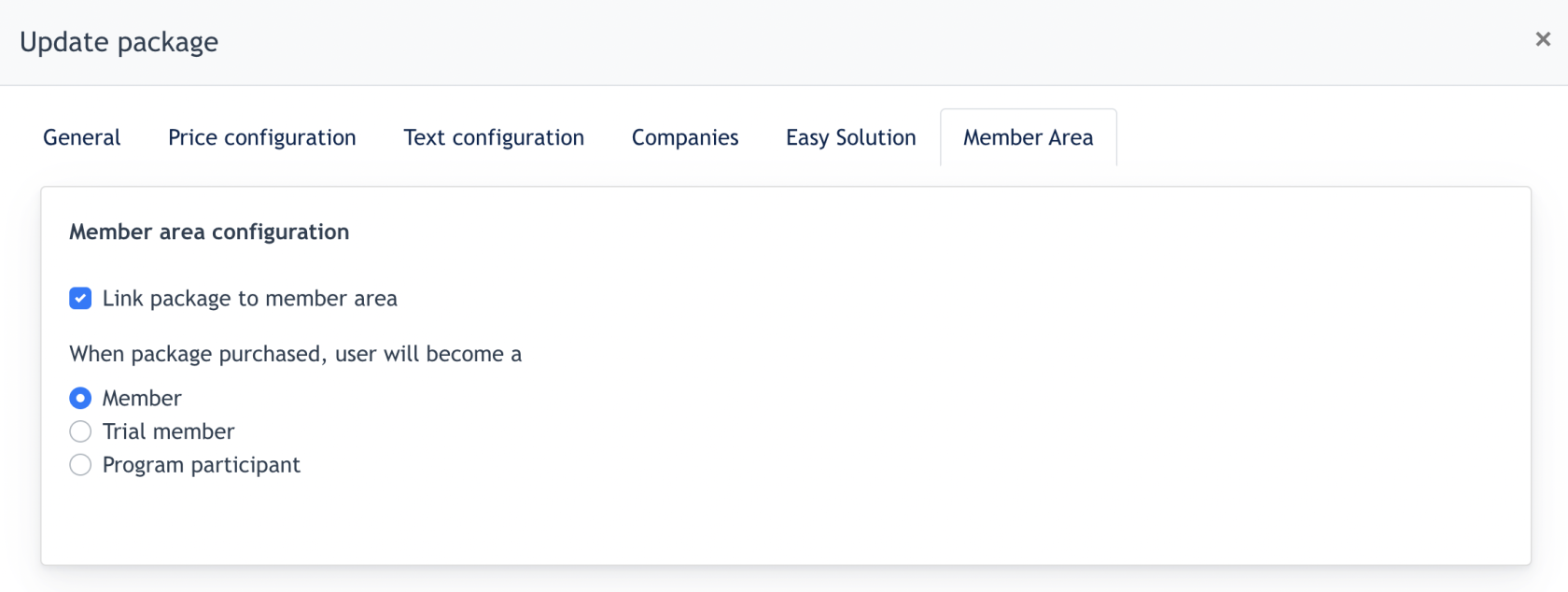
When a user purchases the package, the system automatically assigns the corresponding role.
For detailed package configuration, refer to the Online Shop documentation.
3. Member Area Role Changes
A user's Member Area role can change when they subscribe to another Online Shop package configured with a different role.
For example, a Trial Member can become a Member or Program Participant, while a Program Participant can become a Member.
Note: Each user account can have only one Member Area role at a time.
- the end -